

SPEKTRUM
for Final Cut Pro
Full Colour Control in Final Cut Pro
Meet SPEKTRUM – The most sophisticated colour mixer for Final Cut Pro
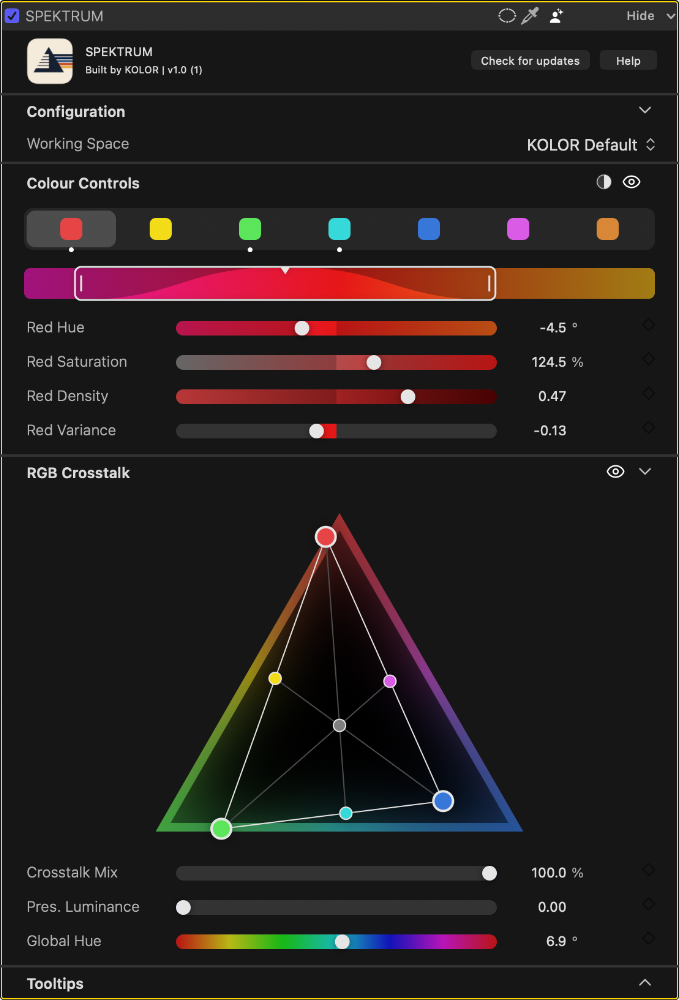
High-End Colour Science made accessible for Everyone
Professional Colour Grading in Final Cut Pro has never been easier, quicker or better
Colour Adjustments that never break. Ever.
We built SPEKTRUM so You don’t have to Babysit your Adjustments Anymore
 Before
 After
Colour Adjustments have never been more Precise
The Cleanest and Most Straightforward Colour Selection You have ever used.
When you touch the qualifier, an overlay appears, showing you exactly what you’re going to target. You can drag the qualifier left or right to decide exactly which areas you want to affect.
Subtractive Saturation and Density in Final Cut Pro
SPEKTRUM uses Subtractive Saturation by Default and employs a Density model that works like colours in the real world do
 Before
 Saturation + Density + Crosstalk
Subtractive Saturation
Usually, when increasing saturation in video, colours tend to get brighter which looks garish and unnatural.
In the real world, as saturation increases, a colour gets increasingly darker as more light is being absorbed.
Therefore, we employ a subtractive saturation model, which mimics how light behaves in the real world.
Density
Instead of reducing the luminance of a given colour range uniformly, SPEKTRUM employs a colour density model.
This means, the more saturated a colour is, the darker it gets.
Density lets you control exactly how much weight you’d like to add to your colours.
It works hand in hand with our Subtractive Saturation to deliver the richest and most natural-looking colours possible.
All those little Details
Make Skin Tones more even or bring out all the Details in a given Colour Range.
The Decision is Yours.
Decreased Variance for more even skin tones:
 Before
 After
Increased Variance for more detail and colour separation in the greenery:
 Before
 After
Build your own Looks and Colour Palettes
With SPEKTRUM, Your Image is in Your Control






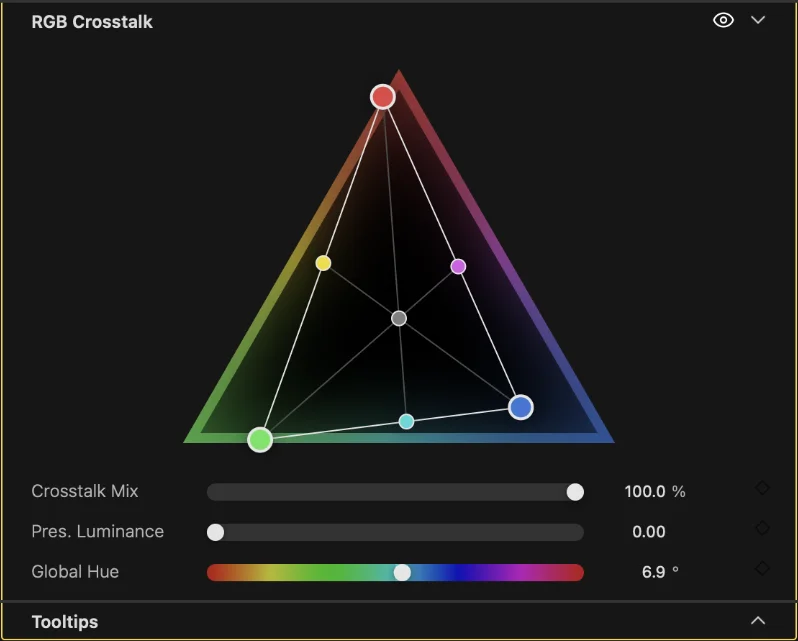
The Channel Mixer Reimagined
The Channel Mixer is one of the most powerful tools for shaping a look’s colour palette. It’s also one of the least intuitive tools in a colourist’s toolbox and often relies on the colourist stumbling upon a good result by accident.
That’s why we reimagined how the channel mixer should work.
Instead of a plain channel mixer, we’re using self-normalising crosstalk so your neutrals stay neutral. We also created a new user interface so it is easier to predict the movements in the colour gamut.
What once was a technical process is now a quick and intuitive adjustment.
Elevate your Colour Grading today
Download SPEKTRUM
for Final Cut Pro
Free Trial
- ✔
- All Features Available
- ✔
- Works for an unlimited amount of time
- ✔
- Instant digital Download
- ❌
- Puts a Watermark on your Image
0 €
Full Version
- ✔
- Free Updates within one Generation
- ✔
- Instant digital Download
- ✔
- Install on as many Macs as you personally own
- ✔
- No Subscription
Business License
- ✔
- Same features as the Full Version
- ⚠️
- Businesses need to purchase as many seats as they need – One seat per person
per seat
System Requirements: 🖥️ Apple Silicon Mac – 🍎 macOS Sonoma or later – 🎬 Final Cut Pro 11.1.1 or later
Any Questions?
Frequently asked questions about SPEKTRUM
Yes! Just select all clips in question and double-click SPEKTRUM. However, we do recommend you colour manage your clips first by transforming them to KOLOR Default using our free Colour Space Transform for Final Cut Pro.
Yes, using our free Colour Space Transform for Final Cut Pro ensures you have all the flexibility you need.
If you’re working with D-Log M, Rec.709 or anything else not natively supported by BASIS, please use our free Colour Space Transform for Final Cut Pro.
Please note that the effectiveness of SPEKTRUM with non-log footage may vary as it cannot reconstruct information that is not there in the first place.
Release Notes
Information about Updates, Releases and Patches
- fixes an issue that caused compatibility issues with any macOS earlier than Golden Gate 27
- initial release

